
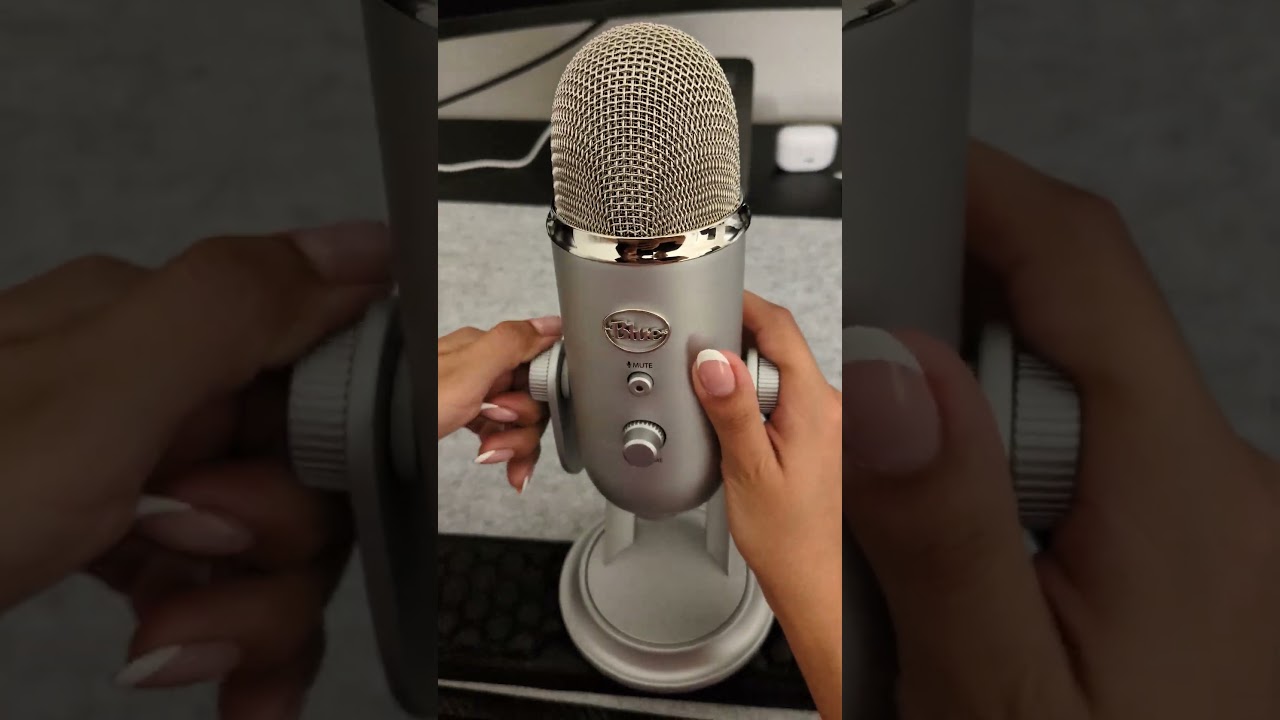
Quick take: the Blue Yeti is an incredible device that connects and works great. It captures your voice cleanly, it's loaded with settings, and it's cheap enough to recommend to anyone starting out. The only thing I ran into was a small software quirk on the Mac Mini — and it was easy to fix.
The mic I'd hand to anyone starting out
For YouTube, podcasting, or just recording your voice, this is the easy pick. It sounds way better than the price suggests, and there's almost no learning curve to get going.
I'll say it straight: the Blue Yeti is a game changer. It's an affordable mic that's just perfect for anyone getting into YouTube, podcasting, or anything where they want to record their voice. You plug it in, it works, and suddenly you sound like you actually know what you're doing.
So many settings, and it just sounds incredible
The Yeti has so many different pickup settings, and it sounds incredible across all of them. It captures your voice with real clarity — full, clean, and present. Whether you're recording a video or talking into a podcast, it makes your voice sound like it belongs there.
The windscreen really does block out the noise
When you add that thing over it that looks like feathers — the windscreen — it really does block out the noise around you. It's extra, it's not included, but I highly recommend it. It's a small add-on that makes a real difference in how clean your recordings come out.
That's the thing about the Yeti: it's an incredible device that connects and works great. There's no drama to it. For the price, you're getting a mic that punches way above what you paid.
One quirk on the Mac Mini — and it was easy to fix
On the Mac Mini I did notice some issues, but they were easy to fix. I was running a lot of different software at once — Adobe After Effects, Bluetooth, the works — and the mic was getting lost in the sauce. I had to remove the software for it to get detected in After Effects. That was really my one complaint, and once it was sorted, it was smooth from there.
So if you're on a Mac and running a heavy stack of creative software, just know you might have to clear some things out so the Yeti gets picked up properly. It's a minor hiccup, not a dealbreaker.
How to use the Blue Yeti: controls & best settings
The Yeti is plug-and-play, but two minutes learning its four controls makes a real difference in how you sound. Here's what every button and knob actually does.
Mute button
Press it to mute or unmute. A flashing light means the mic is muted; a solid light means it's live and recording.
Headphone volume knob
This only controls the volume of headphones plugged into the bottom of the Yeti. It does not change how loud your mic records.
Gain
Gain is the mic's sensitivity. More gain picks up more of everything — your voice, but also room echo, keyboard and fans. Less gain is cleaner, but you need to talk closer. Lower it if the sound distorts, raise it if you're too quiet. For voice, start around 25–40%, not max.
Pattern knob
Changes where the mic listens from. The Yeti has four patterns — the icons on the knob match the four cards below.
Cardioid Heart icon
Best for: solo voice, Zoom, podcasts, gaming, voiceovers. Picks up sound from the front and rejects the back and sides — the setting you want about 90% of the time. The "front" is the side with the Blue logo, not the top.
Omnidirectional Circle icon
Best for: group conversations, room sound, a conference table. Picks up sound from all directions around the mic. Great for several people around a table — bad if your room is noisy.
Bidirectional Figure-8 icon
Best for: a two-person interview. Picks up the front and back of the mic but rejects the sides. Use it when one person sits in front and one directly behind the mic.
Stereo Left/right icon
Best for: music, instruments, ASMR, realistic left/right sound. Records a wide stereo image. Not ideal for normal speaking — it can sound wider, roomier and less focused.
Best setup for your voice — dial it in like this:
- Pattern: Cardioid
- Gain: Low to medium, around 25–40%
- Mic position: Talk into the side with the Blue logo, about 6–10 inches away
- Avoid: Talking into the top of the mic, maxing the gain, or omni mode in a noisy room
Bottom line
The Blue Yeti is one of the easiest mics to recommend, especially for anyone getting into YouTube or podcasting. It sounds incredible, it's loaded with settings, the windscreen is worth the extra spend, and the only snag — a software conflict on the Mac Mini — was quick to fix. At refurbished pricing, it's one of the best creator deals to watch.
Blue Yeti models & prices on Refurbished.Deals right now
Here's a snapshot of the refurbished Blue Yeti listings currently on our site — the standard Yeti in a few colors, the compact Yeti Nano, and the Yeticaster broadcast bundle. Every unit is refurbished and backed by a warranty plus eBay's Money Back Guarantee.
| Model | Condition | Price | Save |
|---|---|---|---|
| Blue Yeti — Black | Certified Refurbished | $45.00was $89.99 | 50% |
| Blue Yeti — Gray | Certified Refurbished | $49.99was $99.99 | 50% |
| Blue Yeti Nano | Certified Refurbished | $50.00was $79.99 | 37% |
| Blue Yeti — Lunar Gray | Very Good | $63.79 | 51% |
| Blue Yeti — Light Blue | Very Good | $64.99 | 50% |
| Blue Yeticaster Pro Broadcast Bundle | Excellent | $69.00 | 47% |
| Blue Yeticaster Pro Bundle (274) | Certified Refurbished | $87.99was $199.99 | 56% |
Last updated May 13, 2026 — prices change daily. For the latest, see our Blue Yeti product page.
How we bought it: the Blue Yeti in this review was purchased refurbished on eBay — through the same Verified Refurbished listings we link to below — and it arrived with a free 2-year Allstate protection plan at no extra cost. That's the standard on eBay's Certified Refurbished items: a 2-year Allstate warranty plus eBay's Money Back Guarantee. It's exactly why we're comfortable buying a mic like this refurbished instead of new.